Manage the accounts you connect to Pagos for payments data importing. See our Connecting Your PSPs guides for the step-by-step setup instructions specific to each processor.
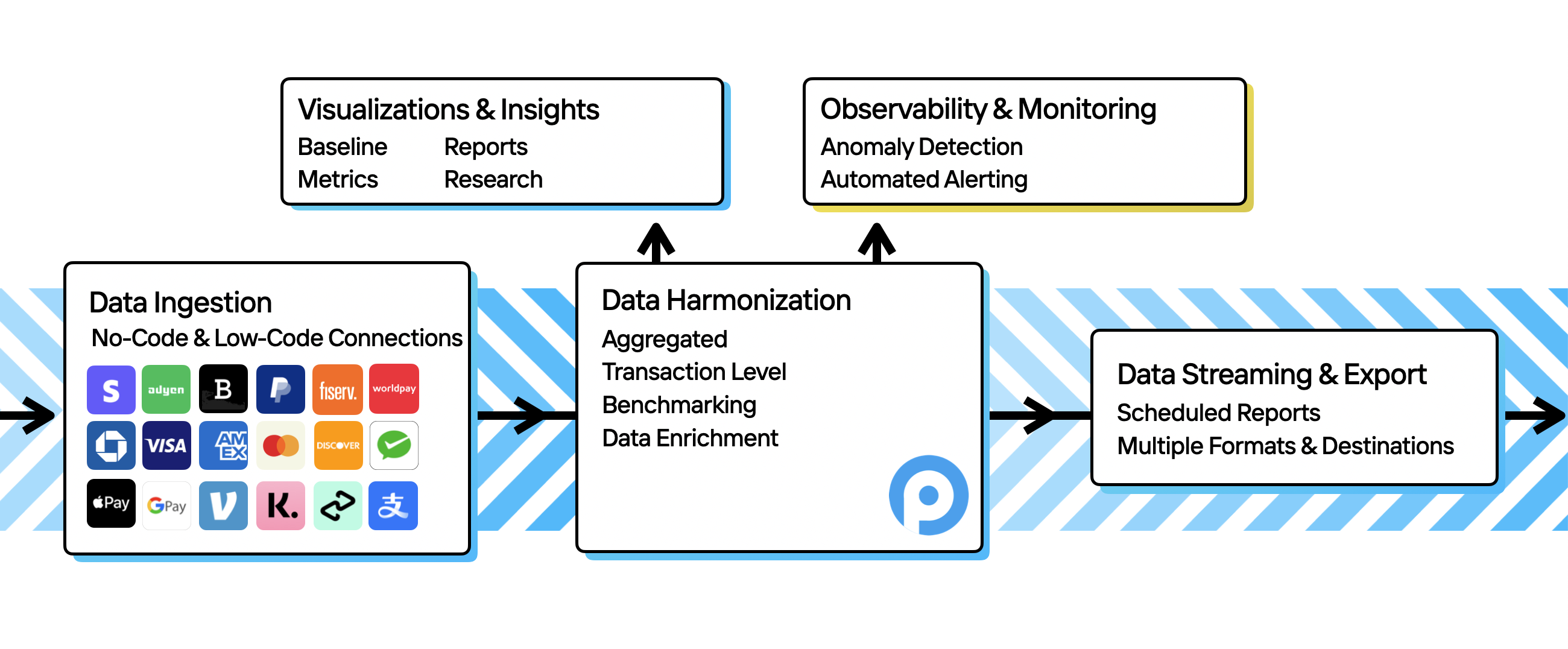
To access Insights, Benchmarking, or Data Exports in the Pagos Service Panel, you must first connect your payment processors to your Pagos account; we will then ingest and harmonize your payments data for visualization, monitoring, or export.
If you’re an Admin user in your Pagos organization, you can add as many data connections to your Pagos account as you need. To add a new data connection:
Click your settings icon in the top-right corner.
Under Data Connections, click Connections.
Click Add Data Connection to open the Add New Data Connection side panel.
Select your Provider from the drop-down menu. If you select Adyen, Stripe, Braintree, Chase, PayPal, dLocal, Amex, Fiserv, FirstData, Bank of America, Checkout.com, or Worldpay, ensure you follow the steps outlined in our Connecting Your Payment Processors to Pagos guides.
Create a Data Connection Name for your data connection.
Fill out the remaining fields; what fields appear depends on the selected payment provider.
You can add aliases to the individual Merchant Account IDs under a data connection. This allows you to assign your own customizable naming structure to your MIDs, which we’ll then surface to you in data visualizations and the Merchant Account IDfilter option in Insights.To add Merchant Account ID aliases:
Locate the data connection you want to edit on the Data Connections page, then click … in the top-right corner.
Click Edit Data Connection to open the Edit Data Connection side panel.
Under Merchant Account ID Aliases, click the Merchant Account ID drop-down menu, then select the merchant account ID.
Type the desired alias in the Alias text box, then click Add Alias.
Repeat steps 3-4 to assign aliases to any other Merchant Account IDs under that data connection.
You can’t undo a data connection deletion. When you remove a data connection from your Pagos account, we immediately remove all historical data from that source from each Pagos product you’re subscribed to.
To remove a data connection and all associated data completely from your Pagos account:
Locate the data connection you want to edit on the Data Connections page, then click … in the top-right corner.
Click Delete Data Connection.
In the confirmation box, click Delete.
{"docsConfig":{"theme":"mint","$schema":"https://mintlify.com/docs.json","name":"Pagos","colors":{"primary":"#03BBFF","light":"#03BBFF","dark":"#03BBFF"},"logo":{"light":"https://mintcdn.com/pagossolutionsinc/3ldyTV7p7miCx1ZO/logo/light2.png?fit=max\u0026auto=format\u0026n=3ldyTV7p7miCx1ZO\u0026q=85\u0026s=2a2e5dc2e58df96233f2a62db0204cf1","dark":"https://mintcdn.com/pagossolutionsinc/3ldyTV7p7miCx1ZO/logo/dark2.png?fit=max\u0026auto=format\u0026n=3ldyTV7p7miCx1ZO\u0026q=85\u0026s=402e696eca3e01c75ea0063842833cc3"},"favicon":"https://mintcdn.com/pagossolutionsinc/f9_N58ZHpBMuG2e5/favicon.svg?fit=max\u0026auto=format\u0026n=f9_N58ZHpBMuG2e5\u0026q=85\u0026s=95f2a4dc8eed2e6945beb38faad3efd4","navbar":{"links":[{"href":"https://pagos.ai/blog","label":"Blog"}],"primary":{"type":"button","label":"Dashboard","href":"https://secure.pagos.ai/"}},"footer":{"socials":{"x":"https://twitter.com/Pagos_AI","github":"https://github.com/pagos-ai","linkedin":"https://www.linkedin.com/company/pagos-ai"}},"integrations":{"posthog":{"apiKey":"phc_Sk5340T30fCN66mm0klmVfeYRsq1vQsEKJjMhcayg43","apiHost":"https://ph.pagos.ai","sessionRecording":false}},"styling":{"latex":false},"navigation":{"pages":[]}},"deployment":{"deploymentMetadataValue":{"subdomain":"pagossolutionsinc","hasAudioNarration":false,"actualSubdomain":"pagossolutionsinc","customDomains":["docs.pagos.ai"],"gitSource":{"type":"github","owner":"pagos-ai","repo":"public-docs","deployBranch":"main","contentDirectory":"","isPrivate":true,"mountPath":"","label":""},"feedback":{"thumbs":false},"entitlements":{"AI_CHAT":{"status":"ENABLED"},"CONTEXTUAL_FEEDBACK":{"status":"ENABLED"},"WEB_MCP":{"status":"ENABLED"},"NARRATION":{"status":"ENABLED"}},"buildId":"6af362a6907969d1998cca98","clientVersion":"0.0.4102","searchFilterCounts":[{"language":"default","tag":"API Reference","count":81},{"language":"default","tag":"Pagos Service Panel","count":60},{"language":"default","tag":"BIN Database","count":27},{"language":"default","tag":"Insights","count":23},{"language":"default","tag":"Data \u0026 Response Codes","count":20},{"language":"default","tag":"Account Updater","count":18},{"language":"default","tag":"Importing Your Data","count":15},{"language":"default","tag":"Connecting Your PSPs","count":13},{"language":"default","tag":"Network Tokenization","count":13},{"language":"default","tag":"Payments Basics","count":13}]},"assistantConfig":{},"basePath":"","hasChatPermissions":true,"hasWebMcpPermissions":true,"toggles":[{"name":"kill-isr","enabled":true,"variant":{"name":"disabled","enabled":false,"feature_enabled":true},"impressionData":false},{"name":"custom-rbac-roles","enabled":true,"variant":{"name":"disabled","enabled":false,"feature_enabled":true},"impressionData":false},{"name":"agent-mintlify-slack","enabled":true,"variant":{"name":"disabled","enabled":false,"feature_enabled":true},"impressionData":false},{"name":"agent-integrations-settings","enabled":true,"variant":{"name":"disabled","enabled":false,"feature_enabled":true},"impressionData":false},{"name":"rbac-expansion","enabled":true,"variant":{"name":"disabled","enabled":false,"feature_enabled":true},"impressionData":false},{"name":"automations-pr-grouping","enabled":true,"variant":{"name":"disabled","enabled":false,"feature_enabled":true},"impressionData":false},{"name":"custom-prefix","enabled":true,"variant":{"name":"disabled","enabled":false,"feature_enabled":true},"impressionData":false},{"name":"analytics-v7","enabled":true,"variant":{"name":"disabled","enabled":false,"feature_enabled":true},"impressionData":false},{"name":"user-flows-analytics","enabled":true,"variant":{"name":"disabled","enabled":false,"feature_enabled":true},"impressionData":false},{"name":"no-publish-flow","enabled":true,"variant":{"name":"disabled","enabled":false,"feature_enabled":true},"impressionData":false},{"name":"workos-onboarding","enabled":true,"variant":{"name":"disabled","enabled":false,"feature_enabled":true},"impressionData":false},{"name":"llms-txt-v2","enabled":true,"variant":{"name":"disabled","enabled":false,"feature_enabled":true},"impressionData":false},{"name":"snapshot-serving-live","enabled":true,"variant":{"name":"disabled","enabled":false,"feature_enabled":true},"impressionData":false},{"name":"stripTemperatureMiddleware","enabled":true,"variant":{"name":"disabled","enabled":false,"feature_enabled":true},"impressionData":false},{"name":"support-platform-pylon-zendesk","enabled":true,"variant":{"name":"disabled","enabled":false,"feature_enabled":true},"impressionData":false},{"name":"snapshot-serving","enabled":true,"variant":{"name":"disabled","enabled":false,"feature_enabled":true},"impressionData":false},{"name":"instant-rollback","enabled":true,"variant":{"name":"disabled","enabled":false,"feature_enabled":true},"impressionData":false},{"name":"granular-notifications-server","enabled":true,"variant":{"name":"disabled","enabled":false,"feature_enabled":true},"impressionData":false},{"name":"granular-notifications","enabled":true,"variant":{"name":"disabled","enabled":false,"feature_enabled":true},"impressionData":false},{"name":"automations-fable","enabled":true,"variant":{"name":"disabled","enabled":false,"feature_enabled":true},"impressionData":false},{"name":"fixed-ai-action-pricing","enabled":true,"variant":{"name":"disabled","enabled":false,"feature_enabled":true},"impressionData":false},{"name":"automation-resolve-merge-conflict","enabled":true,"variant":{"name":"disabled","enabled":false,"feature_enabled":true},"impressionData":false},{"name":"scoped-publishing","enabled":true,"variant":{"name":"disabled","enabled":false,"feature_enabled":true},"impressionData":false},{"name":"mintql","enabled":true,"variant":{"name":"disabled","enabled":false,"feature_enabled":true},"impressionData":false},{"name":"page-level-analytics","enabled":true,"variant":{"name":"disabled","enabled":false,"feature_enabled":true},"impressionData":false},{"name":"editor-version-history-v2","enabled":true,"variant":{"name":"disabled","enabled":false,"feature_enabled":true},"impressionData":false},{"name":"billing-page-v2","enabled":true,"variant":{"name":"disabled","enabled":false,"feature_enabled":true},"impressionData":false},{"name":"full-page-search","enabled":true,"variant":{"name":"disabled","enabled":false,"feature_enabled":true},"impressionData":false},{"name":"workspace-projects","enabled":true,"variant":{"name":"disabled","enabled":false,"feature_enabled":true},"impressionData":false},{"name":"assistant-v5","enabled":true,"variant":{"name":"disabled","enabled":false,"feature_enabled":true},"impressionData":false},{"name":"fork-pr-previews","enabled":true,"variant":{"name":"disabled","enabled":false,"feature_enabled":true},"impressionData":false},{"name":"revalidation-jwt","enabled":true,"variant":{"name":"disabled","enabled":false,"feature_enabled":true},"impressionData":false},{"name":"workos-sso-scim","enabled":true,"variant":{"name":"disabled","enabled":false,"feature_enabled":true},"impressionData":false},{"name":"hobby-abuse-scan","enabled":true,"variant":{"name":"disabled","enabled":false,"feature_enabled":true},"impressionData":false},{"name":"dashboard-inbox","enabled":true,"variant":{"name":"disabled","enabled":false,"feature_enabled":true},"impressionData":false},{"name":"workos-signup","enabled":true,"variant":{"name":"disabled","enabled":false,"feature_enabled":true},"impressionData":false},{"name":"turbopuffer-dual-write","enabled":true,"variant":{"name":"disabled","enabled":false,"feature_enabled":true},"impressionData":false},{"name":"workos-enabled","enabled":true,"variant":{"name":"disabled","enabled":false,"feature_enabled":true},"impressionData":false},{"name":"approve-review-flow","enabled":true,"variant":{"name":"disabled","enabled":false,"feature_enabled":true},"impressionData":false},{"name":"editor-metadata","enabled":true,"variant":{"name":"disabled","enabled":false,"feature_enabled":true},"impressionData":false},{"name":"sso-setup-deadline-banner","enabled":true,"variant":{"name":"disabled","enabled":false,"feature_enabled":true},"impressionData":false},{"name":"turbopuffer-serve","enabled":true,"variant":{"name":"disabled","enabled":false,"feature_enabled":true},"impressionData":false},{"name":"live-agents","enabled":true,"variant":{"name":"disabled","enabled":false,"feature_enabled":true},"impressionData":false}],"googleFontsInlined":false},"customCss":[],"page":{"pagePath":"importing-data/managing-data-connections","slug":"/importing-data/managing-data-connections","pageMetadata":{"title":"Managing Data Connections","description":"Manage the accounts you connect to Pagos for payments data importing. See our **Connecting Your PSPs** guides for the step-by-step setup instructions specific to each processor.","href":"/importing-data/managing-data-connections"},"description":{"compiledSource":"\"use strict\";\nconst {jsx: _jsx, jsxs: _jsxs} = arguments[0];\nconst {useMDXComponents: _provideComponents} = arguments[0];\nfunction _createMdxContent(props) {\n const _components = {\n p: \"p\",\n strong: \"strong\",\n ..._provideComponents(),\n ...props.components\n };\n return _jsxs(_components.p, {\n children: [\"Manage the accounts you connect to Pagos for payments data importing. See our \", _jsx(_components.strong, {\n children: \"Connecting Your PSPs\"\n }), \" guides for the step-by-step setup instructions specific to each processor.\"]\n });\n}\nfunction MDXContent(props = {}) {\n const {wrapper: MDXLayout} = {\n ..._provideComponents(),\n ...props.components\n };\n return MDXLayout ? _jsx(MDXLayout, {\n ...props,\n children: _jsx(_createMdxContent, {\n ...props\n })\n }) : _createMdxContent(props);\n}\nreturn {\n default: MDXContent\n};\n","frontmatter":{},"scope":{}},"pageType":"default","mdx":{"mdxSource":{"compiledSource":"\"use strict\";const{Fragment:_Fragment,jsx:_jsx,jsxs:_jsxs}=arguments[0];const{useMDXComponents:_provideComponents}=arguments[0];function _createMdxContent(props){const _components={a:`a`,li:`li`,ol:`ol`,p:`p`,strong:`strong`,..._provideComponents(),...props.components},{Frame,Heading,OptimizedImage,Warning}=_components;if(!Frame)_missingMdxReference(`Frame`,true);if(!Heading)_missingMdxReference(`Heading`,true);if(!OptimizedImage)_missingMdxReference(`OptimizedImage`,true);if(!Warning)_missingMdxReference(`Warning`,true);return _jsxs(_Fragment,{children:[_jsx(Frame,{children:_jsx(OptimizedImage,{src:`https://mintcdn.com/pagossolutionsinc/QRaDPoi4Ubrfz0Pz/images/data-connections/data-ingestion.png?fit=max\u0026auto=format\u0026n=QRaDPoi4Ubrfz0Pz\u0026q=85\u0026s=4f67856b898ee95d10aca4addec366fd`,alt:`How data ingestion works with other Pagos products.`,\"data-og-width\":`2600`,width:`2600`,\"data-og-height\":`1076`,height:`1076`,\"data-path\":`images/data-connections/data-ingestion.png`,\"data-optimize\":`true`,\"data-opv\":`3`,srcset:`https://mintcdn.com/pagossolutionsinc/QRaDPoi4Ubrfz0Pz/images/data-connections/data-ingestion.png?w=280\u0026fit=max\u0026auto=format\u0026n=QRaDPoi4Ubrfz0Pz\u0026q=85\u0026s=caa644139a490d63b69a78870bb57f45 280w, https://mintcdn.com/pagossolutionsinc/QRaDPoi4Ubrfz0Pz/images/data-connections/data-ingestion.png?w=560\u0026fit=max\u0026auto=format\u0026n=QRaDPoi4Ubrfz0Pz\u0026q=85\u0026s=e80212d5127df817c8b08af2c4cb4926 560w, https://mintcdn.com/pagossolutionsinc/QRaDPoi4Ubrfz0Pz/images/data-connections/data-ingestion.png?w=840\u0026fit=max\u0026auto=format\u0026n=QRaDPoi4Ubrfz0Pz\u0026q=85\u0026s=9f5a1cc103b9726d2bc7af37c1973960 840w, https://mintcdn.com/pagossolutionsinc/QRaDPoi4Ubrfz0Pz/images/data-connections/data-ingestion.png?w=1100\u0026fit=max\u0026auto=format\u0026n=QRaDPoi4Ubrfz0Pz\u0026q=85\u0026s=3b88c228c375f3b85be7a9c835023014 1100w, https://mintcdn.com/pagossolutionsinc/QRaDPoi4Ubrfz0Pz/images/data-connections/data-ingestion.png?w=1650\u0026fit=max\u0026auto=format\u0026n=QRaDPoi4Ubrfz0Pz\u0026q=85\u0026s=6985e81f8bc68eebc65b0b32081c9dbf 1650w, https://mintcdn.com/pagossolutionsinc/QRaDPoi4Ubrfz0Pz/images/data-connections/data-ingestion.png?w=2500\u0026fit=max\u0026auto=format\u0026n=QRaDPoi4Ubrfz0Pz\u0026q=85\u0026s=cbc484212194bc36fc46dc06648cb5dd 2500w`})}),`\n`,_jsxs(_components.p,{children:[`To access `,_jsx(_components.a,{href:`/insights/getting-started-with-insights`,children:`Insights`}),`, `,_jsx(_components.a,{href:`/benchmarking/getting-started-with-benchmarking`,children:`Benchmarking`}),`, or `,_jsx(_components.a,{href:`/insights/data-exports`,children:`Data Exports`}),` in the Pagos Service Panel, you must first connect your payment processors to your Pagos account; we will then ingest and harmonize your payments data for visualization, monitoring, or export.`]}),`\n`,_jsx(Heading,{level:`2`,id:`add-a-new-data-connection`,children:`Add a New Data Connection`}),`\n`,_jsxs(_components.p,{children:[`If you’re an `,_jsx(_components.strong,{children:`Admin`}),` user in your Pagos organization, you can add as many data connections to your Pagos account as you need. To add a new data connection:`]}),`\n`,_jsxs(_components.ol,{children:[`\n`,_jsxs(_components.li,{children:[`\n`,_jsx(_components.p,{children:`Click your settings icon in the top-right corner.`}),`\n`]}),`\n`,_jsxs(_components.li,{children:[`\n`,_jsxs(_components.p,{children:[`Under `,_jsx(_components.strong,{children:`Data Connections`}),`, click `,_jsx(_components.strong,{children:`Connections`}),`.`]}),`\n`]}),`\n`,_jsxs(_components.li,{children:[`\n`,_jsxs(_components.p,{children:[`Click `,_jsx(_components.strong,{children:`Add Data Connection`}),` to open the `,_jsx(_components.strong,{children:`Add New Data Connection`}),` side panel.`]}),`\n`]}),`\n`,_jsxs(_components.li,{children:[`\n`,_jsxs(_components.p,{children:[`Select your `,_jsx(_components.strong,{children:`Provider`}),` from the drop-down menu. If you select Adyen, Stripe, Braintree, Chase, PayPal, dLocal, Amex, Fiserv, FirstData, Bank of America, Checkout.com, or Worldpay, ensure you follow the steps outlined in our `,_jsx(_components.a,{href:`/importing-data/connecting-your-payment-processors-to-pagos`,children:`Connecting Your Payment Processors to Pagos`}),` guides.`]}),`\n`]}),`\n`,_jsxs(_components.li,{children:[`\n`,_jsxs(_components.p,{children:[`Create a `,_jsx(_components.strong,{children:`Data Connection Name`}),` for your data connection.`]}),`\n`]}),`\n`,_jsxs(_components.li,{children:[`\n`,_jsx(_components.p,{children:`Fill out the remaining fields; what fields appear depends on the selected payment provider.`}),`\n`]}),`\n`,_jsxs(_components.li,{children:[`\n`,_jsxs(_components.p,{children:[`Click `,_jsx(_components.strong,{children:`ADD Data Connection`}),`.`]}),`\n`]}),`\n`]}),`\n`,_jsx(Heading,{level:`2`,id:`edit-a-data-connection`,children:`Edit a Data Connection`}),`\n`,_jsx(_components.p,{children:`To make changes to an existing data connection:`}),`\n`,_jsxs(_components.ol,{children:[`\n`,_jsxs(_components.li,{children:[`\n`,_jsxs(_components.p,{children:[`Locate the data connection you want to edit on the `,_jsx(_components.strong,{children:`Data Connections`}),` page, then click `,_jsx(_components.strong,{children:`…`}),` in the top-right corner.`]}),`\n`]}),`\n`,_jsxs(_components.li,{children:[`\n`,_jsxs(_components.p,{children:[`Click `,_jsx(_components.strong,{children:`Edit Data Connection`}),` to open the `,_jsx(_components.strong,{children:`Edit Data Connection`}),` side panel.`]}),`\n`]}),`\n`,_jsxs(_components.li,{children:[`\n`,_jsxs(_components.p,{children:[`Make changes to the existing fields, then click `,_jsx(_components.strong,{children:`Update Connection`}),`.`]}),`\n`]}),`\n`]}),`\n`,_jsx(Heading,{level:`3`,id:`adding-a-merchant-account-id-alias`,children:`Adding a Merchant Account ID Alias`}),`\n`,_jsxs(_components.p,{children:[`You can add aliases to the individual Merchant Account IDs under a data connection. This allows you to assign your own customizable naming structure to your MIDs, which we’ll then surface to you in data visualizations and the `,_jsx(_components.strong,{children:`Merchant Account ID`}),` `,_jsx(_components.a,{href:`/insights/insights-data-filters#filter-options`,children:`filter option`}),` in Insights.`]}),`\n`,_jsx(_components.p,{children:`To add Merchant Account ID aliases:`}),`\n`,_jsxs(_components.ol,{children:[`\n`,_jsxs(_components.li,{children:[`\n`,_jsxs(_components.p,{children:[`Locate the data connection you want to edit on the `,_jsx(_components.strong,{children:`Data Connections`}),` page, then click `,_jsx(_components.strong,{children:`…`}),` in the top-right corner.`]}),`\n`]}),`\n`,_jsxs(_components.li,{children:[`\n`,_jsxs(_components.p,{children:[`Click `,_jsx(_components.strong,{children:`Edit Data Connection`}),` to open the `,_jsx(_components.strong,{children:`Edit Data Connection`}),` side panel.`]}),`\n`]}),`\n`,_jsxs(_components.li,{children:[`\n`,_jsxs(_components.p,{children:[`Under `,_jsx(_components.strong,{children:`Merchant Account ID Aliases`}),`, click the `,_jsx(_components.strong,{children:`Merchant Account ID`}),` drop-down menu, then select the merchant account ID.`]}),`\n`]}),`\n`,_jsxs(_components.li,{children:[`\n`,_jsxs(_components.p,{children:[`Type the desired alias in the `,_jsx(_components.strong,{children:`Alias`}),` text box, then click `,_jsx(_components.strong,{children:`Add Alias`}),`.`]}),`\n`]}),`\n`,_jsxs(_components.li,{children:[`\n`,_jsx(_components.p,{children:`Repeat steps 3-4 to assign aliases to any other Merchant Account IDs under that data connection.`}),`\n`]}),`\n`,_jsxs(_components.li,{children:[`\n`,_jsxs(_components.p,{children:[`Click `,_jsx(_components.strong,{children:`Update Connection`}),`.`]}),`\n`]}),`\n`]}),`\n`,_jsx(Heading,{level:`2`,id:`delete-a-data-connection`,children:`Delete a Data Connection`}),`\n`,_jsx(Warning,{children:_jsx(_components.p,{children:`You can’t undo a data connection deletion. When you remove a data connection from your Pagos account, we immediately remove all historical data from that source from each Pagos product you’re subscribed to.`})}),`\n`,_jsx(_components.p,{children:`To remove a data connection and all associated data completely from your Pagos account:`}),`\n`,_jsxs(_components.ol,{children:[`\n`,_jsxs(_components.li,{children:[`\n`,_jsxs(_components.p,{children:[`Locate the data connection you want to edit on the `,_jsx(_components.strong,{children:`Data Connections`}),` page, then click `,_jsx(_components.strong,{children:`…`}),` in the top-right corner.`]}),`\n`]}),`\n`,_jsxs(_components.li,{children:[`\n`,_jsxs(_components.p,{children:[`Click `,_jsx(_components.strong,{children:`Delete Data Connection`}),`.`]}),`\n`]}),`\n`,_jsxs(_components.li,{children:[`\n`,_jsxs(_components.p,{children:[`In the confirmation box, click `,_jsx(_components.strong,{children:`Delete`}),`.`]}),`\n`]}),`\n`]})]})}function MDXContent(props={}){const{wrapper:MDXLayout}={..._provideComponents(),...props.components};return MDXLayout?_jsx(MDXLayout,{...props,children:_jsx(_createMdxContent,{...props})}):_createMdxContent(props)}return{default:MDXContent};function _missingMdxReference(id,component){throw new Error(`Expected `+(component?`component`:`object`)+\" `\"+id+\"` to be defined: you likely forgot to import, pass, or provide it.\")}","frontmatter":{},"scope":{"config":{},"pageMetadata":{"title":"Managing Data Connections","description":"Manage the accounts you connect to Pagos for payments data importing. See our **Connecting Your PSPs** guides for the step-by-step setup instructions specific to each processor.","href":"/importing-data/managing-data-connections"}}},"mdxSourceWithNoJs":null},"mdxExtracts":{"tableOfContents":[{"title":"Add a New Data Connection","slug":"add-a-new-data-connection","depth":2,"children":[]},{"title":"Edit a Data Connection","slug":"edit-a-data-connection","depth":2,"children":[{"title":"Adding a Merchant Account ID Alias","slug":"adding-a-merchant-account-id-alias","depth":3,"children":[]}]},{"title":"Delete a Data Connection","slug":"delete-a-data-connection","depth":2,"children":[]}],"codeExamples":{}},"jsLinks":["/_mintlify/custom/pagossolutionsinc/8da47cc75b7da22f/playground.js"],"subdomain":"pagossolutionsinc","siteName":"Pagos","title":"Managing Data Connections - Pagos","navMaps":{"firstHrefInVersion":{},"firstHrefInLanguage":{}},"lastModified":"2026-10-23T13:17:19.336Z","originalFileLocation":"importing-data/managing-data-connections.mdx"},"headHtml":"\u003cscript data-mint-head>(function(){var d=document.documentElement,p=null;if(!p){try{p=localStorage.getItem(\"isDarkMode\")}catch(e){}if(p==='true')p='dark';else if(p==='false')p='light';if(p!=='light'\u0026\u0026p!=='dark'\u0026\u0026p!=='system')p=\"system\"}var r=p==='system'?(matchMedia(\"(prefers-color-scheme: dark)\").matches?'dark':'light'):p;d.classList.remove(r==='dark'?'light':'dark');d.classList.add(r);d.setAttribute(\"data-theme-preference\",p)})();\u003c/script>\u003cmeta data-mint-head name=\"description\" content=\"Manage the accounts you connect to Pagos for payments data importing. See our Connecting Your PSPs guides for the step-by-step setup instructions specific to each processor.\">\u003cmeta data-mint-head name=\"application-name\" content=\"Pagos\">\u003cmeta data-mint-head name=\"generator\" content=\"Mintlify\">\u003clink data-mint-head rel=\"icon\" type=\"image/png\" sizes=\"192x192\" href=\"/mintlify-assets/_mintlify/favicons/pagossolutionsinc/RJpyMeY4pItT7M1t/_generated/favicon/android-chrome-192x192.png\" media=\"(prefers-color-scheme: light)\">\u003clink data-mint-head rel=\"apple-touch-icon\" type=\"image/png\" sizes=\"180x180\" href=\"/mintlify-assets/_mintlify/favicons/pagossolutionsinc/RJpyMeY4pItT7M1t/_generated/favicon/apple-touch-icon.png\">\u003clink data-mint-head rel=\"icon\" type=\"image/png\" sizes=\"16x16\" href=\"/mintlify-assets/_mintlify/favicons/pagossolutionsinc/RJpyMeY4pItT7M1t/_generated/favicon/favicon-16x16.png\" media=\"(prefers-color-scheme: light)\">\u003clink data-mint-head rel=\"icon\" type=\"image/png\" sizes=\"32x32\" href=\"/mintlify-assets/_mintlify/favicons/pagossolutionsinc/RJpyMeY4pItT7M1t/_generated/favicon/favicon-32x32.png\" media=\"(prefers-color-scheme: light)\">\u003clink data-mint-head rel=\"shortcut icon\" type=\"image/x-icon\" href=\"/mintlify-assets/_mintlify/favicons/pagossolutionsinc/RJpyMeY4pItT7M1t/_generated/favicon/favicon.ico\" media=\"(prefers-color-scheme: light)\">\u003clink data-mint-head rel=\"icon\" type=\"image/png\" sizes=\"192x192\" href=\"/mintlify-assets/_mintlify/favicons/pagossolutionsinc/RJpyMeY4pItT7M1t/_generated/favicon-dark/android-chrome-192x192.png\" media=\"(prefers-color-scheme: dark)\">\u003clink data-mint-head rel=\"icon\" type=\"image/png\" sizes=\"16x16\" href=\"/mintlify-assets/_mintlify/favicons/pagossolutionsinc/RJpyMeY4pItT7M1t/_generated/favicon-dark/favicon-16x16.png\" media=\"(prefers-color-scheme: dark)\">\u003clink data-mint-head rel=\"icon\" type=\"image/png\" sizes=\"32x32\" href=\"/mintlify-assets/_mintlify/favicons/pagossolutionsinc/RJpyMeY4pItT7M1t/_generated/favicon-dark/favicon-32x32.png\" media=\"(prefers-color-scheme: dark)\">\u003clink data-mint-head rel=\"shortcut icon\" type=\"image/x-icon\" href=\"/mintlify-assets/_mintlify/favicons/pagossolutionsinc/RJpyMeY4pItT7M1t/_generated/favicon-dark/favicon.ico\" media=\"(prefers-color-scheme: dark)\">\u003cmeta data-mint-head property=\"og:title\" content=\"Managing Data Connections - Pagos\">\u003cmeta data-mint-head property=\"og:description\" content=\"Manage the accounts you connect to Pagos for payments data importing. See our Connecting Your PSPs guides for the step-by-step setup instructions specific to each processor.\">\u003cmeta data-mint-head property=\"og:site_name\" content=\"Pagos\">\u003cmeta data-mint-head property=\"og:url\" content=\"https://docs.pagos.ai/importing-data/managing-data-connections\">\u003cmeta data-mint-head property=\"og:type\" content=\"website\">\u003cmeta data-mint-head property=\"og:image\" content=\"https://pagossolutionsinc.mintlify.site/_mintlify/api/og/v2?division=Importing+Your+Data\u0026amp;title=Managing+Data+Connections\u0026amp;description=Manage+the+accounts+you+connect+to+Pagos+for+payments+data+importing.+See+our+**Connecting+Your+PSPs**+guides+for+the+step-by-step+setup+instructions+specific+t\u0026amp;theme=e3944751a4c079606d5d074e\u0026amp;signature=6061613690ad903bf66df1199b7fbee6bd73e4fe8712e385a81660441a341fd8\">\u003cmeta data-mint-head property=\"og:image:width\" content=\"1200\">\u003cmeta data-mint-head property=\"og:image:height\" content=\"630\">\u003cmeta data-mint-head name=\"twitter:card\" content=\"summary_large_image\">\u003cmeta data-mint-head name=\"twitter:title\" content=\"Managing Data Connections - Pagos\">\u003cmeta data-mint-head name=\"twitter:description\" content=\"Manage the accounts you connect to Pagos for payments data importing. See our Connecting Your PSPs guides for the step-by-step setup instructions specific to each processor.\">\u003cmeta data-mint-head name=\"twitter:image\" content=\"https://pagossolutionsinc.mintlify.site/_mintlify/api/og/v2?division=Importing+Your+Data\u0026amp;title=Managing+Data+Connections\u0026amp;description=Manage+the+accounts+you+connect+to+Pagos+for+payments+data+importing.+See+our+**Connecting+Your+PSPs**+guides+for+the+step-by-step+setup+instructions+specific+t\u0026amp;theme=e3944751a4c079606d5d074e\u0026amp;signature=6061613690ad903bf66df1199b7fbee6bd73e4fe8712e385a81660441a341fd8\">\u003cmeta data-mint-head name=\"twitter:image:width\" content=\"1200\">\u003cmeta data-mint-head name=\"twitter:image:height\" content=\"630\">\u003cmeta data-mint-head name=\"msapplication-config\" content=\"/mintlify-assets/_mintlify/favicons/pagossolutionsinc/RJpyMeY4pItT7M1t/_generated/favicon/browserconfig.xml\">\u003cmeta data-mint-head name=\"apple-mobile-web-app-title\" content=\"Pagos\">\u003cmeta data-mint-head name=\"msapplication-TileColor\" content=\"#03BBFF\">\u003clink data-mint-head rel=\"canonical\" href=\"https://docs.pagos.ai/importing-data/managing-data-connections\">\u003clink data-mint-head rel=\"alternate\" type=\"application/xml\" href=\"/sitemap.xml\">\u003clink data-mint-head rel=\"alternate\" type=\"text/markdown\" href=\"/importing-data/managing-data-connections.md\">\u003cscript data-mint-head type=\"application/ld+json\">{\"@context\":\"https://schema.org\",\"@graph\":[{\"@type\":\"Organization\",\"@id\":\"https://docs.pagos.ai/#organization\",\"name\":\"Pagos\",\"url\":\"https://docs.pagos.ai\",\"logo\":{\"@type\":\"ImageObject\",\"url\":\"https://mintcdn.com/pagossolutionsinc/3ldyTV7p7miCx1ZO/logo/light2.png?fit=max\u0026auto=format\u0026n=3ldyTV7p7miCx1ZO\u0026q=85\u0026s=2a2e5dc2e58df96233f2a62db0204cf1\"}},{\"@type\":\"WebSite\",\"@id\":\"https://docs.pagos.ai#website\",\"name\":\"Pagos\",\"url\":\"https://docs.pagos.ai\",\"publisher\":{\"@id\":\"https://docs.pagos.ai/#organization\"}},{\"@type\":\"WebPage\",\"@id\":\"https://docs.pagos.ai/importing-data/managing-data-connections#webpage\",\"url\":\"https://docs.pagos.ai/importing-data/managing-data-connections\",\"name\":\"Managing Data Connections\",\"description\":\"Manage the accounts you connect to Pagos for payments data importing. See our Connecting Your PSPs guides for the step-by-step setup instructions specific to each processor.\",\"dateModified\":\"2026-10-23T13:17:19.336Z\",\"isPartOf\":{\"@id\":\"https://docs.pagos.ai#website\"},\"breadcrumb\":{\"@id\":\"https://docs.pagos.ai/importing-data/managing-data-connections#breadcrumb\"}},{\"@type\":\"BreadcrumbList\",\"@id\":\"https://docs.pagos.ai/importing-data/managing-data-connections#breadcrumb\",\"itemListElement\":[{\"@type\":\"ListItem\",\"position\":1,\"name\":\"Pagos\",\"item\":\"https://docs.pagos.ai\"},{\"@type\":\"ListItem\",\"position\":2,\"name\":\"Managing Data Connections\",\"item\":\"https://docs.pagos.ai/importing-data/managing-data-connections\"}]},{\"@type\":[\"Article\",\"TechArticle\"],\"@id\":\"https://docs.pagos.ai/importing-data/managing-data-connections#article\",\"headline\":\"Managing Data Connections\",\"name\":\"Managing Data Connections\",\"description\":\"Manage the accounts you connect to Pagos for payments data importing. See our Connecting Your PSPs guides for the step-by-step setup instructions specific to each processor.\",\"url\":\"https://docs.pagos.ai/importing-data/managing-data-connections\",\"mainEntityOfPage\":{\"@id\":\"https://docs.pagos.ai/importing-data/managing-data-connections#webpage\"},\"dateModified\":\"2026-10-23T13:17:19.336Z\",\"publisher\":{\"@id\":\"https://docs.pagos.ai/#organization\"},\"isPartOf\":{\"@id\":\"https://docs.pagos.ai#website\"}}]}\u003c/script>\u003cscript data-mint-head type=\"application/ld+json\">{\"@context\":\"https://schema.org\",\"@type\":\"WebSite\",\"name\":\"Pagos\",\"publisher\":{\"@type\":\"Organization\",\"name\":\"Pagos\"},\"provider\":{\"@type\":\"Organization\",\"name\":\"Mintlify\",\"url\":\"https://mintlify.com\"}}\u003c/script>","agentPointerHref":"/importing-data/managing-data-connections.md","siteName":"Pagos","nav":{"global":null,"tabs":[{"tab":"Pagos Service Panel","groups":[{"group":"Getting Started","pages":[{"title":"Getting Started with Pagos","mode":"wide","href":"/getting-started/getting-started-with-pagos"},{"title":"Pagos Domains and IP Addresses","sidebarTitle":"Domains \u0026 IP Addresses","href":"/getting-started/pagos-domains-and-ip-addresses"},{"title":"New User Onboarding Guide","sidebarTitle":"New User Onboarding","href":"/getting-started/new-user-onboarding-guide"},{"title":"Managing Your Pagos Account","sidebarTitle":"Managing Your Account","href":"/getting-started/managing-your-pagos-account"},{"title":"Managing Your Pagos Organization","sidebarTitle":"Managing Your Organization","description":"Update your Pagos Organization and manage its members","href":"/getting-started/managing-your-pagos-organization"}]},{"group":"Importing Your Data","pages":[{"title":"Managing Data Connections","href":"/importing-data/managing-data-connections"},{"group":"Connecting Your PSPs","pages":[{"title":"Connecting Your Payment Processors to Pagos","sidebarTitle":"Connecting to Pagos","description":null,"href":"/importing-data/connecting-your-payment-processors-to-pagos"},{"group":"Adyen","pages":[{"title":"Connect to Adyen","sidebarTitle":"Connect to Adyen","href":"/importing-data/connecting-payment-processors/connect-to-adyen"},{"title":"Reconciling Your Adyen Data in Pagos","sidebarTitle":"Adyen Data Reconciliation","href":"/importing-data/reconciliation/adyen"}]},{"title":"Connect to Amex","sidebarTitle":"Amex","href":"/importing-data/connecting-payment-processors/connect-to-amex"},{"title":"Connect to Braintree","sidebarTitle":"Braintree","href":"/importing-data/connecting-payment-processors/connect-to-braintree"},{"title":"Connect to Checkout.com","sidebarTitle":"Checkout.com","href":"/importing-data/connecting-payment-processors/connect-to-checkoutcom"},{"title":"Connect to dLocal","sidebarTitle":"dLocal","href":"/importing-data/connecting-payment-processors/connect-to-dlocal"},{"title":"Connect to Fiserv, FirstData, and BAMS","sidebarTitle":"Fiserv, FirstData, and BAMS","href":"/importing-data/connecting-payment-processors/connect-to-fiserv-firstdata-bams"},{"title":"Connect to JP Morgan Chase","sidebarTitle":"JP Morgan Chase","href":"/importing-data/connecting-payment-processors/connect-to-jp-morgan-chase"},{"group":"PayPal","pages":[{"title":"Connect to PayPal Direct","sidebarTitle":"PayPal Direct","href":"/importing-data/connecting-payment-processors/connect-to-paypal-direct"},{"title":"Reconciling Your PayPal Direct Data in Pagos","sidebarTitle":"PayPal Data Reconciliation","href":"/importing-data/reconciliation/paypal"}]},{"title":"Connect to Stripe","sidebarTitle":"Stripe","href":"/importing-data/connecting-payment-processors/connect-to-stripe"},{"title":"Connect to WorldPay Vantiv","sidebarTitle":"WorldPay Vantiv","href":"/importing-data/connecting-payment-processors/connect-to-worldpay"}]},{"title":"The Pagos Data Ingestion Services","sidebarTitle":"Data Ingestion Services","href":"/importing-data/the-pagos-data-ingestion-services"}]},{"group":"Pagos AI","pages":[{"title":"Pagos AI Overview","href":"/pagos-ai/pagos-ai-overview"},{"title":"Pagos AI in Insights","href":"/pagos-ai/pagos-ai-insights"},{"title":"Getting Started With the Pagos MCP Server","sidebarTitle":"Pagos MCP Server","href":"/pagos-ai/getting-started-with-pagos-mcp-server"},{"title":"Pagos Tag","href":"/pagos-ai/pagos-tag"},{"title":"Pagos AI Safety and Security FAQ","sidebarTitle":"Safety and Security FAQ","href":"/pagos-ai/pagos-ai-faq"}]},{"group":"Insights","pages":[{"title":"Getting Started With Pagos Insights","sidebarTitle":"Getting Started","href":"/insights/getting-started-with-insights"},{"title":"Pagos Insights Home","sidebarTitle":"Home","href":"/insights/home"},{"group":"Metrics","pages":[{"title":"Metrics Overview","sidebarTitle":"Overview","href":"/insights/metrics/overview"},{"title":"Approvals","href":"/insights/metrics/approvals"},{"title":"Declines","href":"/insights/metrics/declines"},{"title":"Settlements","href":"/insights/metrics/settlements"},{"title":"Chargebacks","href":"/insights/metrics/chargebacks"},{"title":"Disputes","href":"/insights/metrics/disputes"},{"title":"Refunds","href":"/insights/metrics/refunds"}]},{"group":"Alerts","pages":[{"title":"Alerts Overview","sidebarTitle":"Overview","href":"/insights/alerts/alerts-overview"},{"title":"Data Segments Monitored for Alerts","sidebarTitle":"Segments","href":"/insights/alerts/segments"},{"title":"Alerts Logic","sidebarTitle":"Logic","href":"/insights/alerts/alerts-logic"}]},{"title":"Costs","href":"/insights/costs"},{"title":"Snapshots","href":"/insights/snapshots"},{"title":"Charts","href":"/insights/charts"},{"title":"Opportunities","href":"/insights/opportunities"},{"title":"Retry Performance","sidebarTitle":"Retries","href":"/insights/retry-performance"},{"title":"Risks","href":"/insights/risks"},{"title":"BIN Insights","href":"/insights/bin-insights"},{"title":"Events","href":"/insights/events"},{"title":"Custom Data","href":"/insights/custom-data"},{"title":"Pagos Transaction Level Data Exports","sidebarTitle":"Exports","href":"/insights/data-exports"},{"title":"Insights Data Filters","sidebarTitle":"Data Filters","href":"/insights/insights-data-filters"}]},{"group":"Card Brand APIs","pages":[{"title":"BIN","href":"/card-brand-apis/bin"},{"title":"Network Tokens","href":"/card-brand-apis/network-tokens"},{"title":"Account Updater","href":"/card-brand-apis/account-updater"}]},{"group":"Benchmarking","pages":[{"title":"Getting Started With Pagos Benchmarking","sidebarTitle":"Getting Started With Benchmarking","href":"/benchmarking/getting-started-with-benchmarking"},{"title":"Benchmarking Within Insights","href":"/benchmarking/benchmarking-within-insights"}]},{"group":"Legacy","pages":[{"group":"Legacy Canary Guides","pages":[{"title":"Legacy Canary","href":"/legacy/legacy-canary/legacy-canary"},{"title":"Triggers","href":"/legacy/legacy-canary/triggers"},{"title":"Trigger Filters","href":"/legacy/legacy-canary/trigger-filters"},{"title":"Trigger Evaluation Time","href":"/legacy/legacy-canary/trigger-evaluation-time"},{"title":"Events","href":"/legacy/legacy-canary/events"},{"title":"Summaries","href":"/legacy/legacy-canary/summaries"},{"title":"Legacy Alerts","href":"/legacy/legacy-canary/legacy-alerts"}]}]}]},{"tab":"BIN Database","pages":[{"title":"BIN Database","href":"/bin-database/getting-started-with-bin-database"}]},{"tab":"API Reference","pages":[{"title":"API Reference","href":"/authentication/authentication-overview"}]},{"tab":"Payments Basics","pages":[{"title":"Payments Basics","href":"/payments-basics/the-card-payment-lifecycle"}]},{"tab":"Changelog","pages":[{"title":"Changelog","href":"/changelog"}]}]},"basePath":"","title":"Managing Data Connections - Pagos","buildId":"dpl_596ePT575z4qnAFksq1biRW97aLY","deploymentId":"dpl_596ePT575z4qnAFksq1biRW97aLY","dynamics":["07c022d89b","a74be98ba7"],"chunks":["Frame-BXrZabKK.js","DynamicMarkdown-CtasenyM.js","zoom-image-lightbox-C5F0mVLH.js","lightbox-handle-r17bVUz3.js"]}