

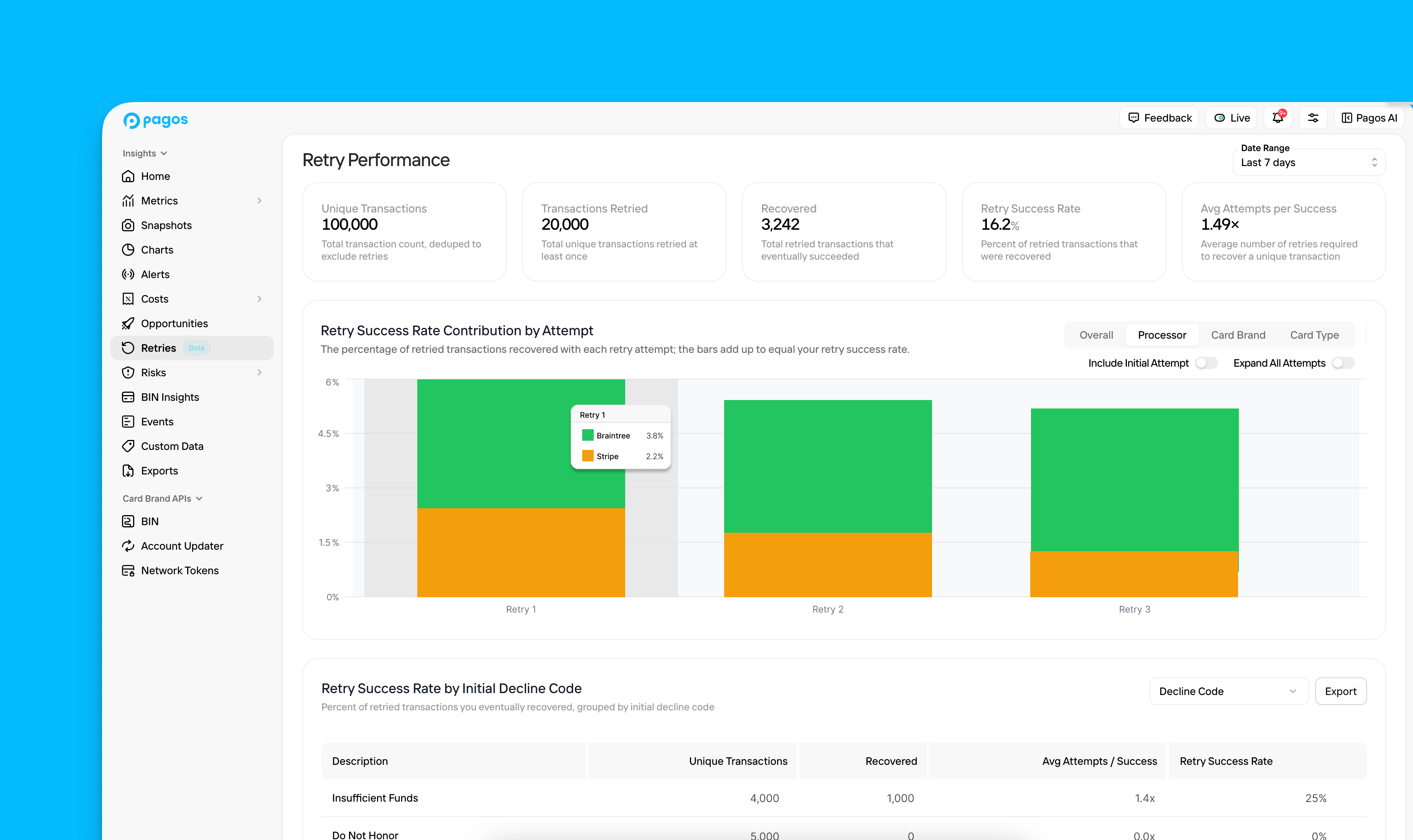
- Retry Statistics
- An interactive Retry Graph
- Retry Success Rate table
How the Date Range filter works:This page includes all unique transactions whose final attempt falls within the selected period, even if earlier attempts in that transaction’s retry sequence occurred before the chosen dates.If your selected date range includes today (e.g. Last 7 days), we treat the latest attempt on record as the final attempt, since future retries haven’t occurred yet. If you’re viewing a completed historical period (e.g. January 1-31, 2026), a transaction is only included if no further attempts were made after the period closes.
Retry Statistics
At the top of the page, you’ll find the following statistics around your retry strategy:- Unique Transactions - Your total transaction count, deduped to exclude identical transaction retries, for which the final attempt occurred in the selected time period
- Transactions Retried - The total number of unique transactions you retried at least once after the initial failed transaction attempt
- Recovered - The total number of unique transactions that eventually succeeded after at least one retry attempt
- Retry Success Rate - The percentage of all retried transactions that eventually succeeded after at least one retry attempt
- Avg Attempts per Success - The average number of retry attempts required before a failed transaction eventually succeeds
Retry Graph
Use the Include Initial Attempt toggle to determine what data appears in the main graph:Off - Retry Success Rate Contribution by Attempt
Off - Retry Success Rate Contribution by Attempt
This graph demonstrates the percentage of retried transactions recovered with each retry attempt. Each bar uses the Transactions Retried value from the Retry Statistics section as the denominator, and the bars add up to equal your Retry Success Rate.
On - Approval Rate Contribution by Attempt
On - Approval Rate Contribution by Attempt
This graph demonstrates the percentage of total unique transactions approved with each attempt in the selected time period, starting with the initial transaction. Each bar uses the Unique Transactions value from the Retry Statistics section as the denominator, so the bars add up to equal your deduped approval rate.
- Processor
- Card Brand
- Card Type
To create these graphs, we look at the attributes associated with the final, successful transaction attempt. This helps you identify which transaction parameters are most likely to result in approval.
Retry Success Rate
This table breaks down your retry success rate by different attributes of your initial transaction attempts. Use this data to identify how likely certain transactions are to eventually succeed or which transactions are worth retrying.This table doesn’t take into account changes made to your transaction routing or the customer’s payment method for subsequent transaction retry attempts.
- Decline Code - The decline code your processor assigned to the initial transaction attempt
- Card Type
- Card Brand
- Mastercard Network Advice
- Issuing Country
- Issuing Bank (Top 25)
- BIN (Top 25)
- Processor