

Unified API Keys
Authorization: BearerNew API domains
bin.pagos.aiNew static IP addresses
Batch download URLs
- These changes are independent of one another and must be addressed independently
- Migrating to the new domain doesn’t migrate your API key, and creating a unified API key doesn’t move you to the new domain
- Check each section below against your integration
Migration Checklist
If you’re impacted by all impending integration changes, complete this entire checklist before September 1, 2026:Create a unified API key
Switch to Bearer authentication
x-api-key, x-client-key, x-date) and replace them with Authorization: Bearer <api key>.Update your endpoint URLs
parrot.prod.pagosapi.com with bin.pagos.ai in production and parrot.sandbox.pagosapi.com with bin.sandbox.pagos.ai in sandbox.Allowlist the new IP addresses
13.248.157.210 and 166.117.218.160 to any firewall rules.Check how you handle batch download URLs
url value returned in the batch response as-is, rather than rebuilding it from a hardcoded domain. If you allowlist that download hostname anywhere, add the new one before September 1.Revoke your legacy keys
Unified API Keys
Pagos originally issued a separate API key for each product, each with its own authentication format. The unified API key replaces all of them: one key that works across the entire Pagos suite and authenticates with a standardAuthorization: Bearer header.
You must update your existing keys to the unified API key by September 1. If either of the following is true, you have legacy API keys that must be updated:
- Your integration sends the API key in an
x-api-keyheader (BIN Data APIs) - Your integration sends
x-client-keyandx-dateheaders with an HMAC signature (Account Updater and Network Tokenization) - You created the key under a product-specific tab in the developer settings of your Pagos account
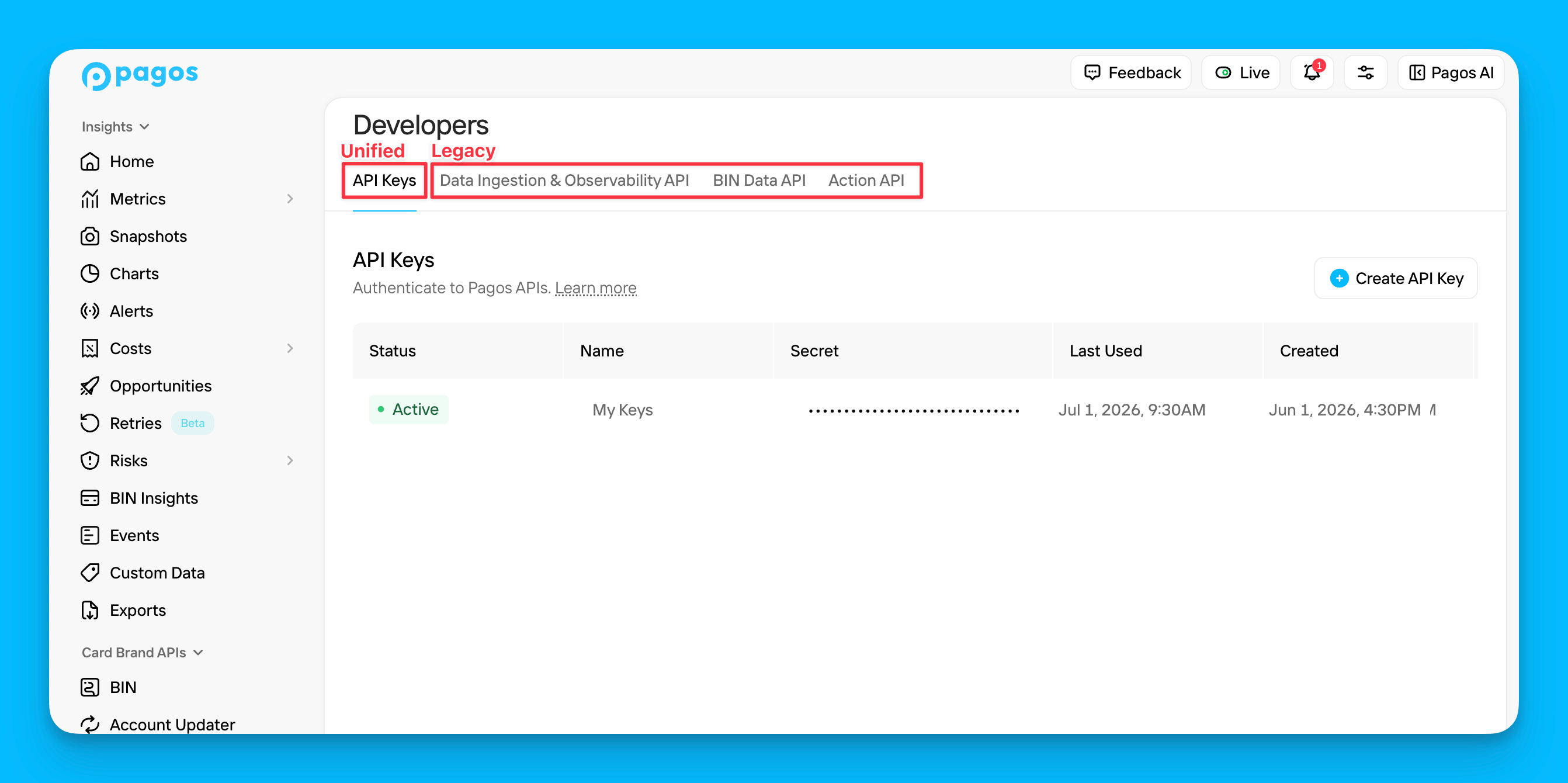
Creating a Unified Key
Follow the instructions in the Pagos API Authentication guide to generate your new unified API key. All unified keys begin with the prefixak_. A single key covers every Pagos product your organization is entitled to, so most integrations replace several product keys with one.
Switching Your Authentication Header
Account Updater and Network Tokenization
If your integration uses Account Updater or Network Tokenization, the legacy authentication involved generating an HMAC signature and sending it withx-client-key and x-date headers. With the unified key, replace all three headers with a single Authorization: Bearer <api key> header. You can remove the HMAC signature generation code entirely.
Real-Time Account Updater (RTAU): When using a unified API key, message encryption is no longer required. You can remove the Request Key and Response Key encryption steps from your integration if you choose. This is optional; we’ll still accept encrypted payloads.
Batch Account Updater: PGP encryption of the batch request and response files is still required regardless of which key type you use. Only the authentication header changes.
New API Domains
The BIN Data APIs have moved to new domains:New Static IP Addresses
The new domains resolve to new static IP addresses. If you allowlist Pagos traffic in a firewall, add these:13.248.157.210166.117.218.160
99.83.189.213 and 75.2.25.63) until they’re retired on September 1, 2026. Keep both sets allowlisted while you’re mid-migration, and remove the legacy pair once you’ve fully cut over.
Batch Download URLs
Responses from the BIN Data Batch/batch/files endpoint contain a url field pointing at the file to download.
Today, that URL still references the legacy domain even when you call the new one:
url exactly as given, rather than extracting the path and appending it to a hardcoded domain. Integrations that follow the returned URL pick up the new domain automatically.
Update Network Controls
If you allowlist the download URLs you get back from the BIN Data Batch API, downloads will start failing on September 1, 2026. Following the URL dynamically isn’t enough on its own, as the hostname inside it changes on that date. Any egress firewall rule, outbound proxy allowlist, or URL filter that permitsparrot.prod.pagosapi.com for downloads must also permit bin.pagos.ai before September 1.
This is easy to miss, because nothing in your own code changes and the failure appears without a deploy. Check for the download hostname in:
- Outbound proxy or egress firewall rules
- URL or domain allowlists on a corporate network
- Any allowlist maintained by a data platform or ETL tool that fetches the file on your behalf
bin.pagos.ai (production) and bin.sandbox.pagos.ai (sandbox) alongside your existing entry now and remove the legacy hostname after the cutover. If you allowlist by IP rather than hostname, add the new IP addresses.
What Doesn’t Change
- Request and response formats - Apart from the batch
urldomain described above, no field is added, removed, or reformatted by this migration; switching to a unified key has no effect on response bodies - Other headers - Account Updater and Network Tokenization still require
X-Merchant-ID, unchanged - Batch AU file encryption - Batch Account Updater still requires PGP encryption of request and response files
- Paths and query parameters - Only the domain changes;
/bins,/batch/files, and every other path stays the same - Rate limits and entitlements - Your unified key inherits the product access your organization already has
Troubleshooting
401: This API key is invalid.
401: This API key is invalid.
x-api-keyis always validated as a legacy keyAuthorization: Beareris always validated as a unified key
x-api-key, or a legacy key sent as Authorization: Bearer, fails even though the key itself is valid. Confirm the key type and header match.Also confirm the key matches the environment you’re calling. Test Mode keys don’t authenticate production requests.401: API requires an API key in 'x-api-key' header.
401: API requires an API key in 'x-api-key' header.
Authorization: Bearer <api key> and that the header isn’t being stripped by a proxy or gateway in front of your integration.I created a new key but it still doesn't work.
I created a new key but it still doesn't work.
Authorization: Bearer. Create the key on the main API Keys tab instead. See the image in the Unified API Keys section above for further clarification.My key works on one product but not another.
My key works on one product but not another.
Requests time out or are refused after switching domains.
Requests time out or are refused after switching domains.
Batch file downloads started failing and we didn't change anything.
Batch file downloads started failing and we didn't change anything.
url returned by /batch/files points at bin.pagos.ai instead of parrot.prod.pagosapi.com. If an egress firewall, outbound proxy, or URL filter only permits the legacy hostname, the download is blocked even though your integration is behaving correctly and nothing was deployed.Follow the steps under Update Network Controls to add bin.pagos.ai to the allowlist.I lost the key value after creating it.
I lost the key value after creating it.
Frequently Asked Questions
My existing key works on both the legacy and new domains. Do I still need a new key?
My existing key works on both the legacy and new domains. Do I still need a new key?
What happens on September 1, 2026?
What happens on September 1, 2026?
Do I need a separate key for each Pagos product?
Do I need a separate key for each Pagos product?
Can I run legacy and unified keys side by side?
Can I run legacy and unified keys side by side?
Does migrating change my API responses?
Does migrating change my API responses?
url domain (starting September 1, 2026). Switching your key or your endpoint has no effect on response bodies. If you’re seeing another difference, it isn’t caused by this migration; contact support@pagos.ai and we’ll look into it.How many unified keys can I create?
How many unified keys can I create?