> ## Documentation Index
> Fetch the complete documentation index at: https://docs.pagos.ai/llms.txt
> Use this file to discover all available pages before exploring further.
# Account Updater
> Monitor and manage the Account Updater API (batch and real-time).
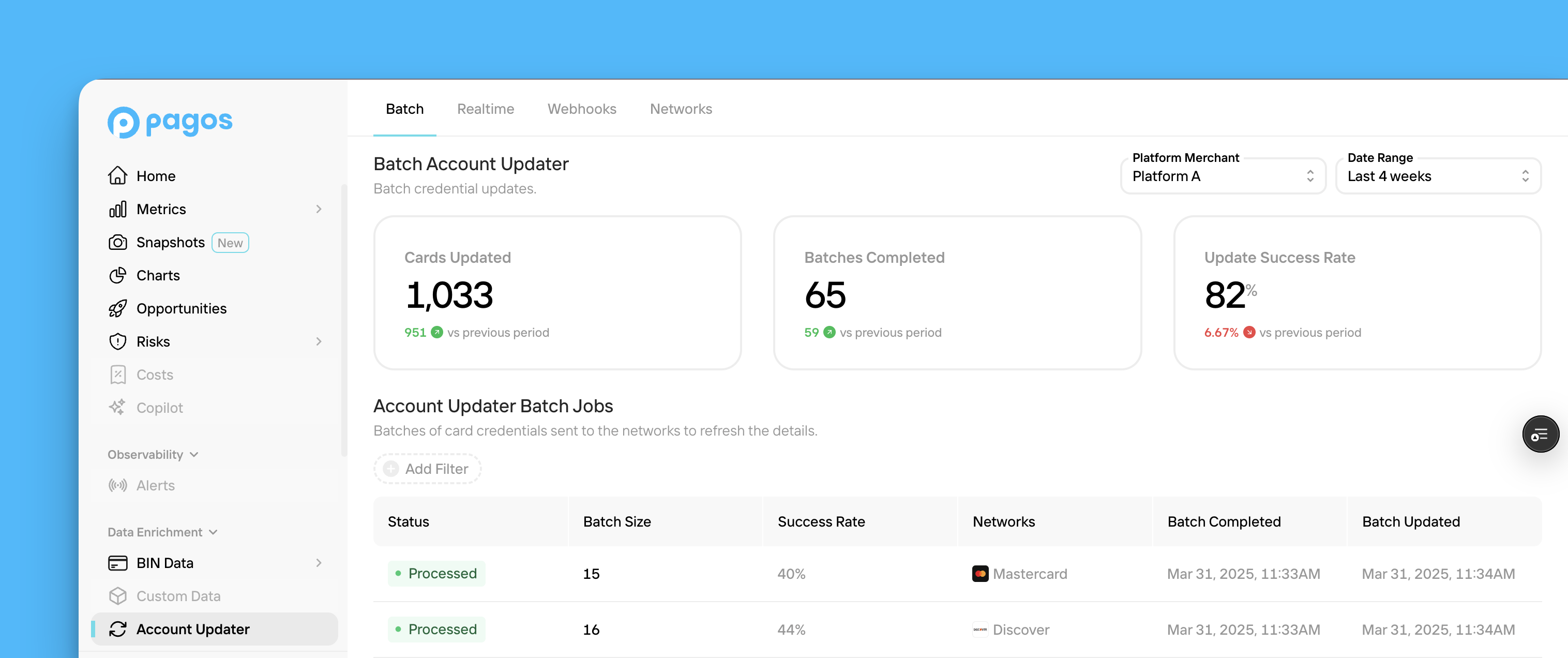 All [Pagos Account Updater](https://pagos.ai/product/account-updater) subscribers can access the **Account Updater** section of the Pagos Service Panel.
Card brands like Visa and Mastercard provide issuing banks with secure communication networks to assist them in distributing updated card information to merchants or payment service providers (PSPs) who vault card credentials. By leveraging these networks, your business can decrease customer checkout friction and churn, and increase overall transaction approval rates by keeping customer card information updated. Pagos has two account updater tools:
Request updated card details in batches to keep your vault up to date.
Update card details in real time during checkout to boost approval rates.
To access the Account Updater section, click **Account Updater** under **Card Network APIs** in the main navigation. This section contains the following tabs:
* [Batch](#batch)
* [Real-Time](#real-time)
* [Webhooks](#webhooks)
* [Networks](#networks)
If you operate a platform providing account updater services to select merchants, you'll also have a [Merchants](#merchants) tab.
## Batch
The **Batch** tab provides a breakdown of the batches of card credentials you've sent to Pagos for account updates via the [Batch Account Updater API](/account-updater/batch-api-overview). To navigate this tab:
Use the **Date Range** filter in the top-right corner of the page to select the time period you want to view data for.
If you operate a platform, use the **Platform Merchant** drop-down to select the merchant for whom you want to view batch account updater data.
The cards across the top of the page provide the following stats:
* **Cards Updated** - The number of card credentials sent in batches to Pagos for credential updates
* **Batches Completed** - The number of batches you've received credential updates for
* **Response Success Rate** - The percentage of credentials included in your batches that received [non-error response code](/account-updater/batch-update-codes#response-codes) from the networks
Each row in the table represents a batch of card credentials sent for updates in the set time period, including the update status, number of credentials included in the batch, success rate of the entire batch, and card network contacted for updates. Click **Add Filter** to filter the table for only those batches with a specific status.
Click on a batch to open a side panel with additional details including the **Batch ID** and any [response codes](/account-updater/batch-update-codes#response-codes) or [error codes](/account-updater/batch-update-codes#error-codes) returned from the network.
## Real-Time
The **Real-Time** tab provides more information about the [Real-Time Account Updater API](/account-updater/real-time-api-overview) calls you've made to update individual credentials in real time, including:
* **API Calls** - The number of API calls you've made to the Real-Time Account Updater API
* **API Response** - The number of credentials that received [non-error response codes](/account-updater/batch-update-codes#response-codes) from the networks in real time
* **Response Success Rate** - The percentage of credentials that received [non-error response codes](/account-updater/batch-update-codes#response-codes) from the networks in real time
Use the **Date Range** filter in the top-right corner of the page to select the time period you want to view data for. If you operate a platform providing account updater services to a variety of merchants, use the **Platform Merchant** drop-down to select the merchant for whom you want to view batch account updater data.
## Webhooks
From the **Webhooks** tab, you can add and edit [webhooks](/account-updater/batch-webhooks) for Batch Account Updater job status changes. To do so:
In the Account Updater Webhook Endpoint box, click **Edit**.
Paste your endpoint URL in the text box.
Add your own secret key. Save this for [validating webhooks](/account-updater/batch-webhooks#validating-webhooks) in the future.
Click **Save Webhook Endpoint**.
The **Event Delivery Attempts** table lists the events that triggered your webhook in the set time period. Each row includes the event type, job ID associated with the batch, reason, and date created. Click **Add Filter** to filter the table for only those events with a specific status.
## Networks
From the **Networks** tab, you can view the card networks you're configured to receive credential updates from (American Express, Discover, Visa, and Mastercard). To enable or deactivate any networks, contact your Pagos Account Manager.
## Merchants
This tab only appears for platform merchants.
The **Merchants** tab includes a table listing the merchants operating within your platform. Each row contains the merchant name, primary contact, and creation date. Here, you'll also find each merchant's **Merchant ID**, used to identify individual merchants in the API headers of calls to [Batch Account Updater](/account-updater/batch-api-headers#merchant-identification) or [Real-Time Account Updater](/account-updater/real-time-api-headers#merchant-identification).
All [Pagos Account Updater](https://pagos.ai/product/account-updater) subscribers can access the **Account Updater** section of the Pagos Service Panel.
Card brands like Visa and Mastercard provide issuing banks with secure communication networks to assist them in distributing updated card information to merchants or payment service providers (PSPs) who vault card credentials. By leveraging these networks, your business can decrease customer checkout friction and churn, and increase overall transaction approval rates by keeping customer card information updated. Pagos has two account updater tools:
Request updated card details in batches to keep your vault up to date.
Update card details in real time during checkout to boost approval rates.
To access the Account Updater section, click **Account Updater** under **Card Network APIs** in the main navigation. This section contains the following tabs:
* [Batch](#batch)
* [Real-Time](#real-time)
* [Webhooks](#webhooks)
* [Networks](#networks)
If you operate a platform providing account updater services to select merchants, you'll also have a [Merchants](#merchants) tab.
## Batch
The **Batch** tab provides a breakdown of the batches of card credentials you've sent to Pagos for account updates via the [Batch Account Updater API](/account-updater/batch-api-overview). To navigate this tab:
Use the **Date Range** filter in the top-right corner of the page to select the time period you want to view data for.
If you operate a platform, use the **Platform Merchant** drop-down to select the merchant for whom you want to view batch account updater data.
The cards across the top of the page provide the following stats:
* **Cards Updated** - The number of card credentials sent in batches to Pagos for credential updates
* **Batches Completed** - The number of batches you've received credential updates for
* **Response Success Rate** - The percentage of credentials included in your batches that received [non-error response code](/account-updater/batch-update-codes#response-codes) from the networks
Each row in the table represents a batch of card credentials sent for updates in the set time period, including the update status, number of credentials included in the batch, success rate of the entire batch, and card network contacted for updates. Click **Add Filter** to filter the table for only those batches with a specific status.
Click on a batch to open a side panel with additional details including the **Batch ID** and any [response codes](/account-updater/batch-update-codes#response-codes) or [error codes](/account-updater/batch-update-codes#error-codes) returned from the network.
## Real-Time
The **Real-Time** tab provides more information about the [Real-Time Account Updater API](/account-updater/real-time-api-overview) calls you've made to update individual credentials in real time, including:
* **API Calls** - The number of API calls you've made to the Real-Time Account Updater API
* **API Response** - The number of credentials that received [non-error response codes](/account-updater/batch-update-codes#response-codes) from the networks in real time
* **Response Success Rate** - The percentage of credentials that received [non-error response codes](/account-updater/batch-update-codes#response-codes) from the networks in real time
Use the **Date Range** filter in the top-right corner of the page to select the time period you want to view data for. If you operate a platform providing account updater services to a variety of merchants, use the **Platform Merchant** drop-down to select the merchant for whom you want to view batch account updater data.
## Webhooks
From the **Webhooks** tab, you can add and edit [webhooks](/account-updater/batch-webhooks) for Batch Account Updater job status changes. To do so:
In the Account Updater Webhook Endpoint box, click **Edit**.
Paste your endpoint URL in the text box.
Add your own secret key. Save this for [validating webhooks](/account-updater/batch-webhooks#validating-webhooks) in the future.
Click **Save Webhook Endpoint**.
The **Event Delivery Attempts** table lists the events that triggered your webhook in the set time period. Each row includes the event type, job ID associated with the batch, reason, and date created. Click **Add Filter** to filter the table for only those events with a specific status.
## Networks
From the **Networks** tab, you can view the card networks you're configured to receive credential updates from (American Express, Discover, Visa, and Mastercard). To enable or deactivate any networks, contact your Pagos Account Manager.
## Merchants
This tab only appears for platform merchants.
The **Merchants** tab includes a table listing the merchants operating within your platform. Each row contains the merchant name, primary contact, and creation date. Here, you'll also find each merchant's **Merchant ID**, used to identify individual merchants in the API headers of calls to [Batch Account Updater](/account-updater/batch-api-headers#merchant-identification) or [Real-Time Account Updater](/account-updater/real-time-api-headers#merchant-identification).