> ## Documentation Index
> Fetch the complete documentation index at: https://docs.pagos.ai/llms.txt
> Use this file to discover all available pages before exploring further.
# Getting Started with the Pagos BIN Database
This content is designed for subscribers to the Pagos BIN Database only. If you've subscribed to multiple Pagos services, head over to our [Getting Started with Pagos](/getting-started/getting-started-with-pagos) guide.
With the Pagos BIN Database, you can request detailed bank and market data for the payment cards your customers transact with. Submit a 6-10 digit bank identification number (BIN)—also known as an Issuer Identification number (IIN)—for a customer's card and receive information about the card type and brand, the bank that issued it, and details of the market it was issued in, such as currency, country, and time zone.
BIN data can help you better understand both your customers and their preferred payment cards. With this added context, you can design and implement a payments strategy that benefits your bottom line and improves the checkout experience for your customers!
## Request BIN Data From the Pagos APIs
Pagos provides two APIs for accessing our BIN data tools:
Submit a BIN to our simple REST API and receive a JSON object back containing known details for that BIN! All Pagos BIN Database subscribers can access the BIN Data API.
Use this file-based product to bulk retrieve BIN bank and market details via a file you add to your local database. To access the BIN Data Batch API, you must subscribe to the Batch BIN File add-on.
BIN Data API users can also query BIN data through AI agents using the [Pagos MCP Server](/mcp/getting-started-with-pagos-mcp-server).
## Perform BIN Lookups Via the UI
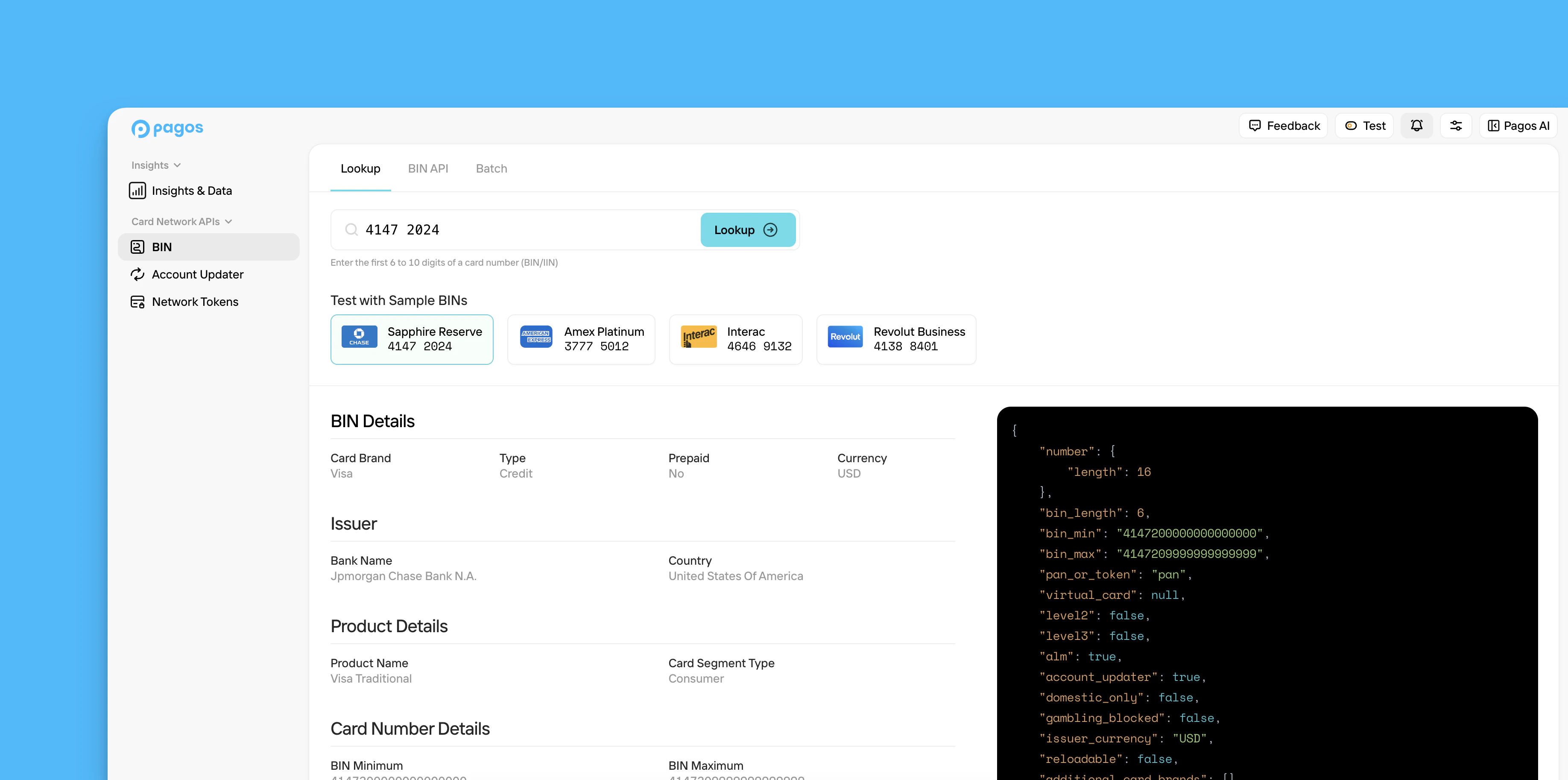 To perform BIN lookups directly from the Pagos Service Panel, click **BIN** in the main navigation, then click the **Lookup** tab. Enter a BIN value into the search bar and click **Lookup**. The BIN details appear in both plain text and as they would in a response from the [BIN Data API](/bin-data-APIs/bin-data-api-overview). For a full list of the data fields available and their descriptions, see our [BIN Data API Dictionary](/bin-data-APIs/bin-data-api-dictionary).
## Review Your BIN API Metrics
To monitor and manage your usage of the BIN Data API, navigate to the **BIN** section of the Pagos Service Panel, then click the **BIN API** tab.
This tab contains the following visuals:
* **Requests** - The number of API requests you've made for Standard vs. Enhanced BIN data over the selected date range
* **Response Time** - The response times for API requests made to for Standard vs. Enhanced BIN data over the selected date range
By default, these graphs contain data from the last seven days; to view historical data, use the **Date Range** filter.
## Download the BIN Data Batch File
To download a batch file of the most up-to-date BIN data pulled directly from the card networks, navigate to the **BIN** section of the Pagos Service Panel, then click the **Batch** tab.
* Click **Standard BIN Batch File** to download a file of the [standard BIN data fields](/bin-data-APIs/batch-api-dictionary#standard-data-fields).
* Click **Enhanced BIN Batch File** to download a file of the [enhanced BIN data fields](/bin-data-APIs/batch-api-dictionary#enhanced-data-fields)
Only subscribers to [Batch BIN File add-on](https://pagos.ai/pricing) can download files from the **Batch** tab.
If you prefer to use the BIN Data Batch API to request these files, see the [BIN Data Batch API Overview](/bin-data-APIs/batch-api-overview) guide.
To perform BIN lookups directly from the Pagos Service Panel, click **BIN** in the main navigation, then click the **Lookup** tab. Enter a BIN value into the search bar and click **Lookup**. The BIN details appear in both plain text and as they would in a response from the [BIN Data API](/bin-data-APIs/bin-data-api-overview). For a full list of the data fields available and their descriptions, see our [BIN Data API Dictionary](/bin-data-APIs/bin-data-api-dictionary).
## Review Your BIN API Metrics
To monitor and manage your usage of the BIN Data API, navigate to the **BIN** section of the Pagos Service Panel, then click the **BIN API** tab.
This tab contains the following visuals:
* **Requests** - The number of API requests you've made for Standard vs. Enhanced BIN data over the selected date range
* **Response Time** - The response times for API requests made to for Standard vs. Enhanced BIN data over the selected date range
By default, these graphs contain data from the last seven days; to view historical data, use the **Date Range** filter.
## Download the BIN Data Batch File
To download a batch file of the most up-to-date BIN data pulled directly from the card networks, navigate to the **BIN** section of the Pagos Service Panel, then click the **Batch** tab.
* Click **Standard BIN Batch File** to download a file of the [standard BIN data fields](/bin-data-APIs/batch-api-dictionary#standard-data-fields).
* Click **Enhanced BIN Batch File** to download a file of the [enhanced BIN data fields](/bin-data-APIs/batch-api-dictionary#enhanced-data-fields)
Only subscribers to [Batch BIN File add-on](https://pagos.ai/pricing) can download files from the **Batch** tab.
If you prefer to use the BIN Data Batch API to request these files, see the [BIN Data Batch API Overview](/bin-data-APIs/batch-api-overview) guide.